Which picture earned the money?
The same image or video runs in many ads across many campaigns. This report re-cuts ad-level spend and attributed revenue by creative, so you judge the asset, not one ad.
One row per creative, summed across campaigns
Each row carries the thumbnail with a full-size preview, spend, attributed revenue, ROAS, and the ads and campaigns running it. Impressions and CTR show by default; CPM is one column away.
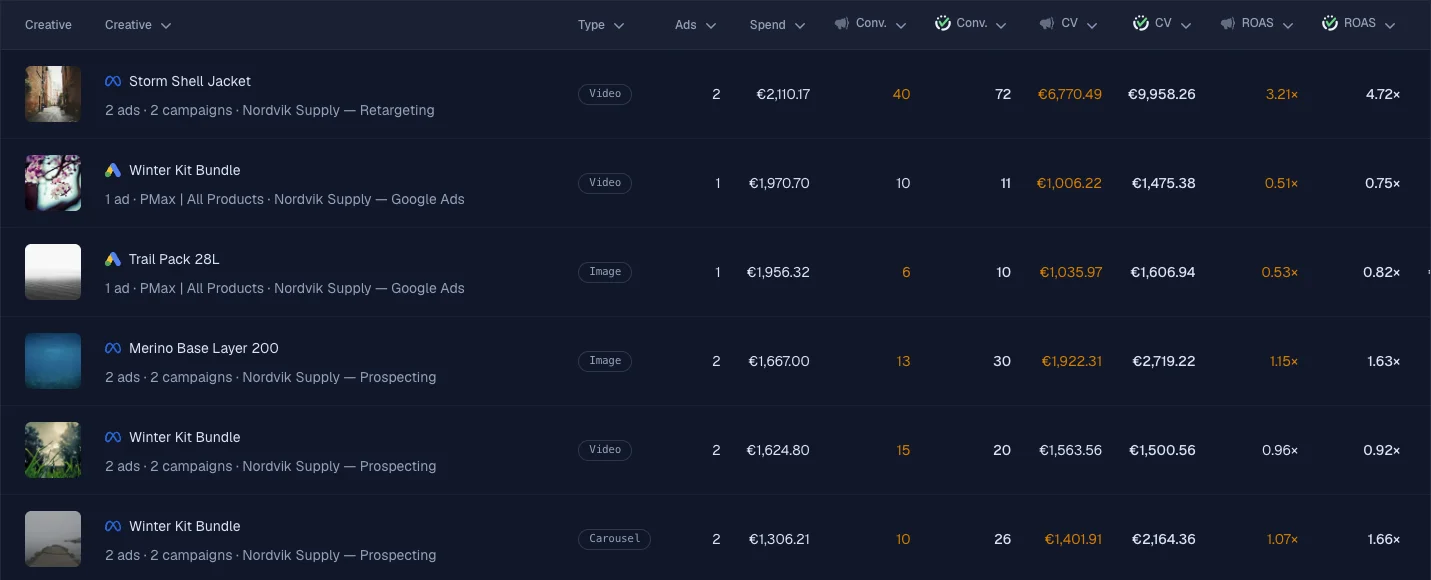
Summed across every campaign
However many ads and campaigns run one asset, it gets one row: its ads' spend and attributed revenue added up.
One row per currency
A creative that ran in two ad-account currencies shows one row per currency, never a blended total.
Nothing dropped silently
Ads with no synced creative are counted out loud under the table, spend included.
Grouped from the Attribution report's own rows
The page groups the exact ad-level rows the Attribution report uses, so the two can never disagree about one ad.
Fatigue you read yourself
When impressions climb while CTR slides and CPM rises, the creative is wearing out, and the row shows it happening.
No black-box scores
RoasProof never stamps a “fatigued” verdict. It shows the numbers and lets you read them.
The ad-level view lives in the Attribution report.
impressions rising · CTR falling · CPM rising
Three platforms, each on its own terms
“Creative” means something different on each platform. The report respects that instead of papering over it.
Meta
Meta has true shared creative objects. One image reused by many ads resolves to one creative.
On Google the ad is the creative. A responsive search ad is a text creative with no image, shown as exactly that.
TikTok
On TikTok a video ad's picture is its poster frame, so every video creative still gets a real thumbnail.
Fast thumbnails, honest numbers
Images from our own CDN
Creative images are mirrored and served from RoasProof's CDN: fast, and thumbnails don't break when a platform link expires.
“—” is never zero
A metric the platform didn't report renders as “—”, never as a 0.00 that looks like a result.
CSV export that honors filters
Export the table as CSV; your filters apply.
Start sending signals your ad platforms can actually use.
Connect your store, verify your events, and watch match quality climb. Free 14-day trial, no credit card required.