Know on the 10th, not on the 31st
Give every ad account a monthly budget. RoasProof projects where the month is heading and warns you before it runs past the number, while there is still time to act.
A budget, a bar, and a projection
Spend syncs hourly from Meta, Google and TikTok. Every account with a budget gets a month-to-date bar, a projected month-end figure, and an over / on-track / under badge.
One budget per ad account
Set it inline on the Meta, Google or TikTok page, in that account's own currency. Budgets in different currencies are never summed into one fake total.
An even-pace notch
The mark on each bar shows where spend should stand today if the month were pacing evenly. Ahead or behind is visible at a glance.
A projection, not a guess
The month-end figure is computed from completed days of measured spend: the same hourly-synced numbers the rest of RoasProof reports on.
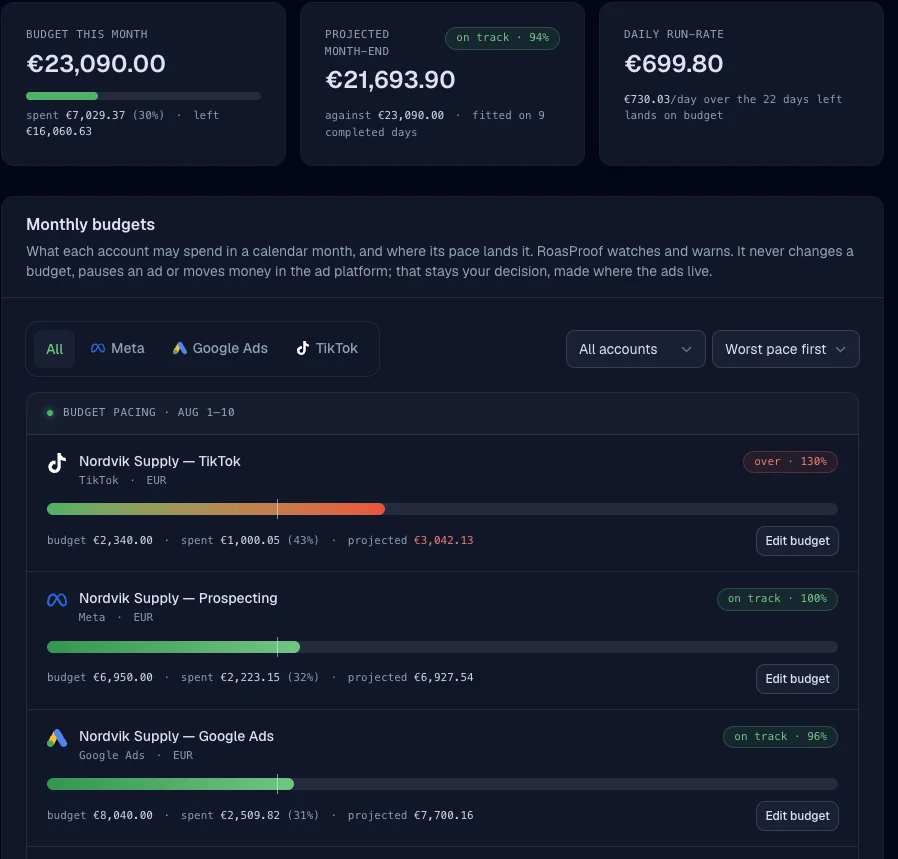
A warning before the month runs past the budget
When actual or projected spend crosses the budget, you hear about it once, not once an hour.
“RoasProof reports and warns. It never acts.”
No budget is pushed to any platform, nothing is paused, no money is moved. You keep control; RoasProof gives the early warning.
One email per account per month
The overspend alert fires the moment actual or projected spend crosses the budget, then stays quiet until next month.
A webhook for your own systems
budget.threshold_reached goes out to any endpoint you register. Route it to Slack, or anywhere else, with your own tooling.
Pacing across accounts
A Budget pacing tile on the composable Dashboard summarizes every account's state in one place.
See the Budget pacing tile on the Dashboard for the cross-account view. Once you know what a month will cost, attribution tells you what it brought back.
Start sending signals your ad platforms can actually use.
Connect your store, verify your events, and watch match quality climb. Free 14-day trial, no credit card required.